Käyttöopas
•Tammikuu, 2022
Sisäinen lasku
Selitys siitä, mihin sisäisiä laskuja käytetään ja miten käyttää niistä saatavaa tietoa.
Sisäisen laskun muodon selitys
Sisäiset laskut ovat viikoittaisia raportteja siitä, mitkä työkalut ovat olleet poissa varastosta (jollakin henkilöllä tai sijoitettuna). Vuokra-arvo lasketaan automaattisesti ja pyöristetään ylöspäin lähimpään sopivaan yksikköön. Tätä laskua ei tarvitse maksaa minnekään. Tarkoituksena on auttaa sinua laskuttamaan eteenpäin työkaluihin liittyviä kustannuksia, esimerkiksi vuokrauksessa. Se voi toimia myös muistuttajana, jos kalliit työkalut ovat käyttämättöminä jossain laitoksessa. Ehkä ne voisivat olla paremmassa käytössä jossain muualla.
Saat 1 sisäisen laskun per tilausnumero/tilausmerkki, joka sisältää kaikki työkalut, jotka ovat olleet vuokrattuna yhdessä tai useammassa jaksossa kyseisellä tilausmerkillä viime viikolla. ”Vuokrattuna” tarkoittaa tässä jaksoja, joissa työkalu ei ollut rekisteröitynä mihinkään varastoon.
Saat jokaisessa sähköpostissa sisäisen laskun 3 muodossa: suoraan sähköpostin viestitekstinä, PDF-liitteenä ja taulukkolaskennassa. Jotkut yritykset lähettävät nämä sähköpostit yhteiseen jakelusoitteeseen, joka menee kaikille asiavastaaville, ja sieltä jokaisen on helppo poimia ”oman” tilauksensa kustannukset.

Ota Raportti-moduuli käyttöön ja syötä sähköpostiosoite(-osoitteet) kenttään 2 ”Sähköposti sisäisen laskun vastaanottamiseen”. Voit syöttää useita sähköposteja pilkulla erotettuna, jos haluat.
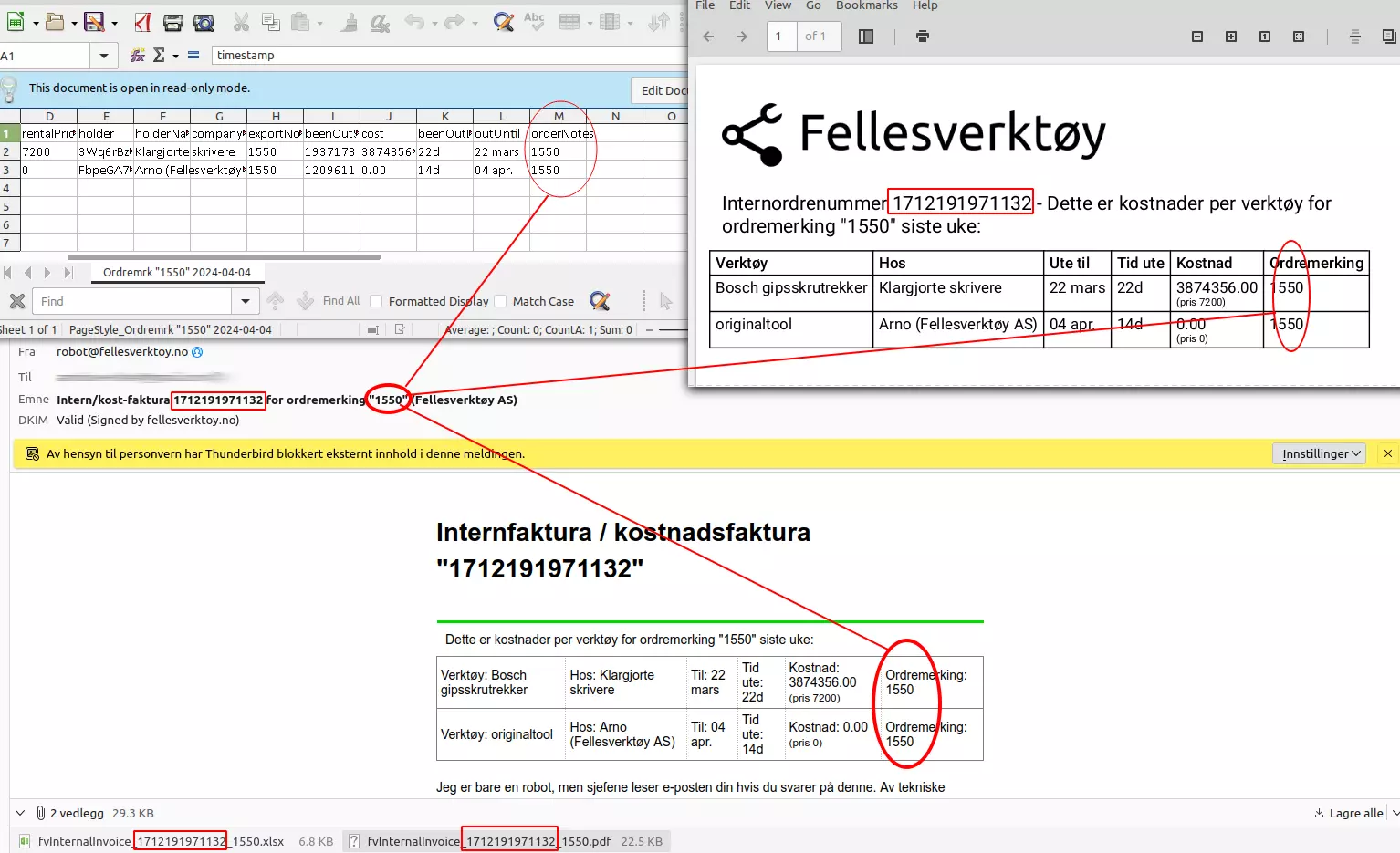
Jokaisella sähköpostilla on yksilöllinen sisäisen laskun numero (punaiset neliöt), joka näkyy sähköpostin otsikossa ja liitteen nimissä. Tilausmerkki löytyy myös sähköpostin otsikosta, viestin tekstistä ja PDF-asiakirjasta sekä jokaiselta riviltä yksityiskohdissa.
Muutokset edellisestä versiosta
Versio 2 korjaa sen, miten kausivälin lopussa yhä otettuna olevien työkalujen kustannus lasketaan. Sen sijaan, että luotettaisiin siihen, kuka on «nykyinen haltija» juuri laskun luontihetkellä, lasku selvittää nyt, kuka työkalua todella piti kauden lopussa. Se tarkistaa myös kaikki yrityksen varastot - ei vain työkalun yhtä kotivarastoa - kun päätetään, onko työkalu yhä otettuna. Jos työkalun vuokrahintaa ei voida ratkaista, rivi merkitään nyt sen sijaan, että se hiljaisesti laskutettaisiin ilmaisena.
Itse sähköposti-, PDF- ja taulukkolaskentamuodot ovat muuttumattomia versiosta 1 - sarakejärjestys ja otsikot pysyvät samoina, joten kaikki versiota 1 lukemaan rakennettu toimii edelleen version 2 kanssa.
ERRATA/Korjaukset tähän versiota 2 kuvaavaan dokumenttiin:
- Ei vielä mitään.
Lähetys
Sisäiset laskut lähetetään kaikille yrityksille klo 08:00 joka maanantai ”Oslon aikaa”. Jos jotain menee pieleen ja meidän täytyy korjata raportointitoiminto, seuraava raportti sisältää tapahtumat edellisen raportin lähetysajasta alkaen. Tämä tarkoittaa, että saat yleensä viikkoraportteja siitä, mitä on tapahtunut maanantaista maanantaihin klo 08:00. Suunnilleen. Palvelimen kuormituksesta riippuen raportointi voi alkaa hieman ennen tai jälkeen klo 08:00:00.
Kun aktivoit raporttimoduulin ensimmäistä kertaa, saat automaattisesti raportin viimeiseltä 2 viikolta. Voit ottaa meihin yhteyttä, jos haluat raportin eri ajankohdasta.
Aikarajoitus
Emme voi toimittaa lokeja ennen 1. tammikuuta 1970 klo 00:00:00 UTC emmekä tulevaisuudesta (pitäisi toimia hyvin kaikille asiakkaillemme). Vuoden 2038 ongelma on huomioitu. Meillä tulee olemaan ongelma vuodenvaihteessa 9999/10000 jKr., mutta päivitämme sovelluksen hyvissä ajoin etukäteen.
Tietolähteet
Useimmat lokin kentät tallennetaan ”sellaisina kuin ne olivat sillä hetkellä”. Esimerkiksi loki näyttää työkalujen nimet sellaisina kuin ne olivat tapahtuman aikaan. Siksi samalla työkalulla voi olla eri nimiä lokin eri kohdissa.
Jotkut kentät haetaan vientihetkellä, joten arvo on voinut olla erilainen tapahtuman aikaan:
- Työntekijänumerot
- Vuokrahinta
Nämä ovat tyypillisesti kenttiä, joita ei päivitetä kovin usein, mutta jos olet muuttanut niitä viikon aikana, vientihetken arvo (joka on lähes varmasti maanantai klo 08:00) näytetään.
Jotkut kentät lasketaan vientihetkellä, kuten päivämääräkentät, ”päiviä/tunteja/minuutteja/sekunteja ulkona” ja kustannus.
Vaaditut asetukset
Jotta vienti toimisi, sinun täytyy:
- rastittaa ”Raportti” Yritysasetuksissa
- täyttää ”Sähköposti sisäisen laskun vastaanottamiseen” Yritysasetuksissa
- Voit syöttää useita sähköpostiosoitteita pilkulla erotettuna, jos haluat lähettää usealle.
Muoto
Robotti lähettää sähköpostin osoitteeseen/-osoitteisiin, jotka on määritetty ”Sähköposti sisäisen laskun vastaanottamiseen” -kenttään Yritysasetuksissa.
Sähköpostissa on sama lista viestin tekstissä, liitteenä olevassa CSV-tiedostossa ja PDF-liitteessä. Mukana on aina CSV- ja PDF-tiedosto, vaikka tapahtumia ei olisi ollut viime kerrasta.
- Merkistö UTF-8
- Kenttäerotin on pilkku ,
- Rivierotin on LF ( , 0x0a)
- Desimaalierotin on piste .
- Aikavyöhyke on Europe/Oslo ja huomioi kesä/talviajan.
- Päivämäärämuoto on ”VVVV-KK-PP TT:MM:SS”, esimerkiksi ”2026-07-13 08:15:01” on 13. heinäkuuta 2026 klo 08:15:01 Oslon aikaa
- Kentät, jotka sisältävät lainausmerkkejä tai pilkkuja, ympäröidään lainausmerkeillä, ja sisäiset lainausmerkit tuplataan, standardin CSV-koodauksen mukaisesti
Aika ulkona/sisällä
Aika lasketaan siitä, kun työkalu otetaan pois jostakin yrityksen varastosta, ja päättyy, kun se laitetaan takaisin johonkin yrityksen varastoon - ei vain työkalun yhteen kotivarastoon. Jos työkalu on yhä otettuna kauden lopussa, lasku selvittää, kuka sitä piti sillä hetkellä, sen sijaan, että luotettaisiin siihen, kuka on «nykyinen haltija» juuri laskun luontihetkellä. Jos työkalu otettiin pois useita viikkoja sitten, ”aika ulkona” on tyypillisesti 7 päivää joka viikkoraportissa, kunnes työkalu rekisteröidään takaisin varastoon.
Avaaminen
CSV-tiedostot ovat pelkkää tekstiä, ja voit avata ne esimerkiksi taulukkolaskentaohjelmalla.
Raporttien tuonti laskentataulukoihin
Jos käytät LibreOfficea, OpenOfficea, Google Sheetsiä tai Numbersia, voit yksinkertaisesti avata CSV-tiedoston ja valita UTF-8, pilkulla erotettu.
Excel on hieman erilainen, koska se ei jostain syystä kysy suodatinasetuksia CSV:tä avatessasi.
Avataksesi CSV-tiedoston Excelissä sinun täytyy:
- Avaa uusi laskentataulukko
- Mene kohtaan Tiedot → Nouda ulkoisia tietoja → Tekstistä
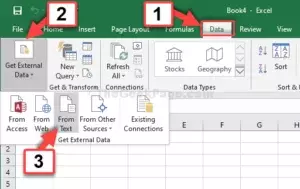
- Valitse CSV-tiedosto
- Valitse merkistöksi UTF8
- Valitse erotettu merkeillä (ei kiinteä pituus)
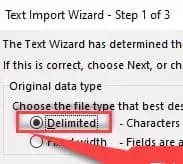
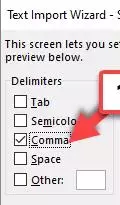
- Valitse pilkku ainoaksi kenttäerottimeksi (ja '' tekstille; se on yleensä oletuksena)
- Paina Seuraava / Valmis muutaman kerran
Nyt voit tehdä tavallisia laskentataulukkotoimintoja tiedoilla
← Takaisin kaikkiin käyttöoppaisiin
Viimeksi päivitetty: 12. tammikuuta 2022